SOFTWARE


Please note: Due to a recent name change, Altair HyperMesh is now Simcenter HyperMesh.
Simcenter HyperMesh is an all-purpose preprocessing tool capable of meshing for a wide range of applications. The latest version introduces a unified interface, making it easier for users to learn and navigate across multiple HyperWorks products. The GUI automatically adjusts based on the selected solver profile and supports multiple solver profiles and versions. Users can switch from one solver profile to another with just one click without impacting already completed work. Switching from one solver to another can also be done before starting the session or while in an active session.
Switching between HyperWorks clients like HyperGraph, HyperView, and MotionView has become seamless and easy. When a model prepared in one client needs to be used in another, the required client can simply be selected from the menu bar. HyperWorks will automatically load the appropriate client along with the project and supporting files.
Navigation becomes even easier using the page layout feature, where the graphics window can be split between different HyperWorks clients. For example, one section of the graphics window can be assigned to HyperMesh while another displays a different client. These windows can also be synchronized, and additional clients can be added to create multi-window workflows.
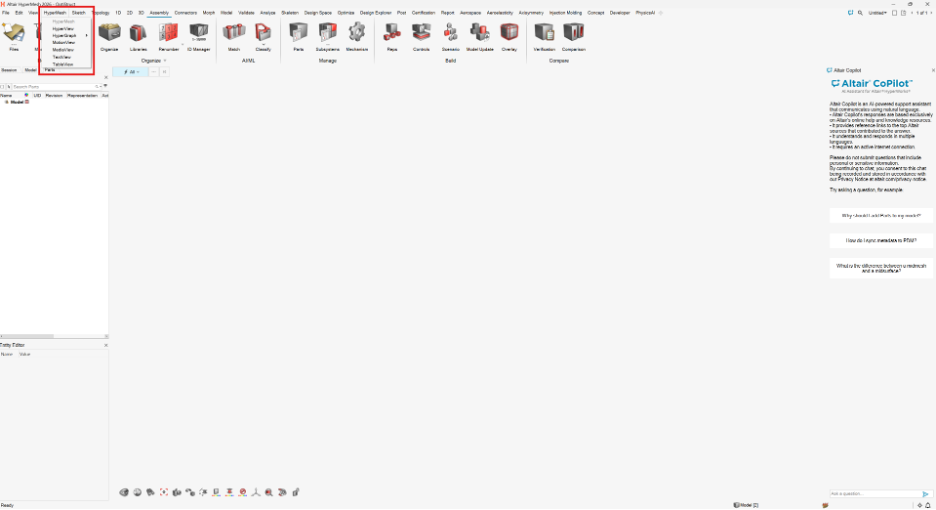
As we know, preprocessing typically involves meshing, material assignment, property definition, and applying boundary conditions. Updating bulk data entry cards to match different solver profiles is often a challenge for CAE analysts. In HyperMesh, however, these cards update automatically when the solver or solver version changes. As a best practice, users should still review and verify the cards before exporting the input file for solving.
With the release of Simcenter HyperMesh 2026, several notable updates and enhancements have been introduced across different ribbon selectors. One key addition is the Copilot, an AI-powered support assistant that responds using information from Simcenter’s online help and knowledge resources. It can also assist users in developing workflows and understanding prerequisite steps.
I am highlighting the enhancements I observed when using the Optistruct solver profile. In the sketch ribbon, by adding the Slots tool, the user can now create elongated holes with just two to three clicks, and the Image plane tool is used as a background reference to trace lines for initial design.
With the growing demand for Artificial Intelligence and Machine Learning, HyperMesh now has a dedicated tool for automatically grouping the selected parts into part sets based on the comparison method and criteria selected, all while training a machine learning model. When a new design is imported for the same model, it can compare, update, and generate a comparison report. Artificial Intelligence functions are also extended to the design study under the Design Explorer ribbon.
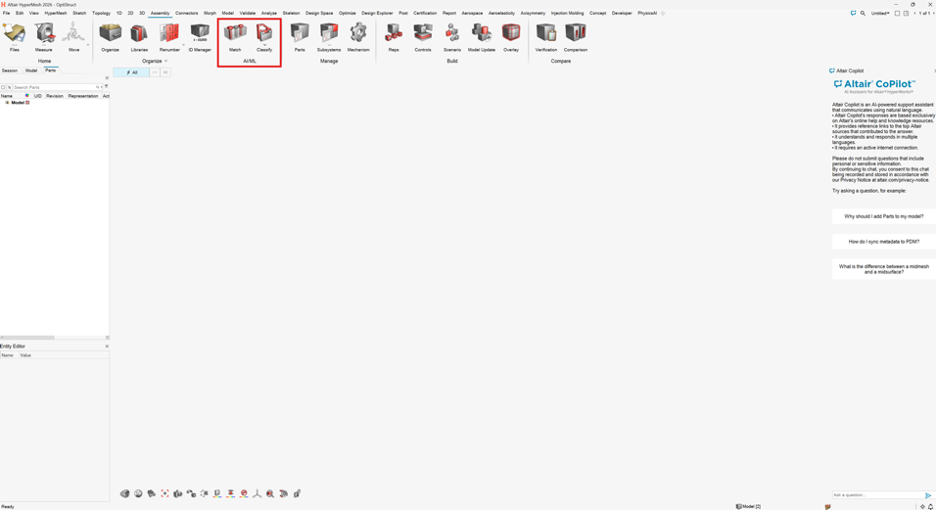
These cumulative updates and enhancements have elevated the overall experience of using Simcenter HyperMesh. They have provided users with improved functionality, visualization options, and flexibility when preparing solver-specific input decks.
As an authorized reseller of this software, Designfusion provides certified engineering support to CAE analysts working in automotive, aerospace, and heavy‑equipment industries. If you’re looking for strong after‑sales service or expert engineering assistance to strengthen your project team, we’re here to help.

Lohith Porwal is an Application Specialist and has over 7 years of experience as a CAE analyst. He has been with Designfusion since October 2024, supporting Siemens CAE tools. His main focus is developing workflows and providing support on live projects.
Designfusion is the largest dedicated solution provider of Siemens PLM software in North America. With an expert support team and a decade of history in the industry designfusion is the #1 choice for companies looking to best enhance their software acquisition.
305 Milner Ave, Suite 308,
Toronto, Ontario, M1B 3V4
Canada
Phone: 416 267-5542
Toll Free: 1-888-567-3933


2734, rue Étienne Lenoir Laval, Quebec. H7R 0A3
Canada
Phone: 514-761-5682
Toll Free: 1-866-534-5682


565, rue Shefford, Suite 1
Bromont, Québec, J2L 1C2
Canada
Phone: 450-534-5682
Toll Free: 1-866-534-5682
1400 E Touhy Ave, Suite 477
Des Plaines, IL 60018
USA
Phone: 847-439-0555
Toll Free: 1-866-921-1830
2900 Auburn Court
Auburn Hills, MI 48326
USA
Toll Free: 1-866-921-1830
151 Castleberry Ct. Ste. C
Milford, OH 45150 USA
Toll Free: 1-866-921-1830
60 Scarsdale Rd, Unit 119
Toronto, Ontario, M3B 2R7
Canada
1919, Boulevard Lionel-Bertrand Suite 101, Boisbriand,
QC J7H 1N8, Canada

