SOFTWARE


“My geometry is simulation-ready, and I don’t need any clean-up.”
You’ve likely heard this phrase, or used it yourself, to meet tight deadlines and streamline collaboration with teams that rely heavily on simulation results.
Unfortunately, the group most affected by this so-called “shortcut” is almost always the simulation team.
Based on the experience of Designfusion engineers, underlying geometric issues such as gaps, intersecting surfaces, holes, and non-manifold edges are often the true culprits. Even with ideal discretization settings, these defects can cause simulations to fail. Designfusion provides engineering resources specifically to tackle these problems.
Let’s consider a Linear Static Analysis of the aircraft model shown below.

Saying that this model is simulation-ready would be a myth. Our team closely examined the model and found:
1. Duplicate surfaces
2. Intersecting surfaces
3. Holes
If this model were discretized as-is and used for simulation, errors would be unavoidable. And that’s where the real challenges begin.
Simulation debugging typically starts with the boundary conditions. If they appear correct, the next step is mesh verification. At this stage, mesh repair often involves resolving errors like:
1. Non-manifold edges
2. Free edges
3. Slivers
4. Duplicate surfaces
This debugging stage can consume a significant amount of project time. Designfusion can supplement your engineering team to help you catch up and stay on schedule by cleaning and preparing the geometry for mesh generation. A clean model improves the quality of the mesh before running a stable and predictable simulation. It is mandatory to examine the geometry. This step not only informs the modeling strategy but also helps identify the root cause of errors that appear later in the simulation process.
The most important question in CAD clean-up is what should be removed and what should be retained. Features such as fillets, chamfers, and holes that do not support or interface with adjacent components should typically be removed. Sometimes, faces are divided or combined to ensure proper mesh flow and achieve a coincident mesh.
In the above aircraft example, the simulation's goal is to evaluate the fuselage's behavior. Our team followed this approach:
1. Repaired the duplicate and small sliver surfaces on the model.
2. Some component structures were removed, such as the fuselage antenna, and replaced with a point mass as a modeling strategy.
3. The landing gear assembly was excluded from the scope of the simulation.
4. Only one side of the model was cleaned due to longitudinal symmetry, then mirrored to create the complete, clear, and meshable model.
The final simulation-ready model is shown below.
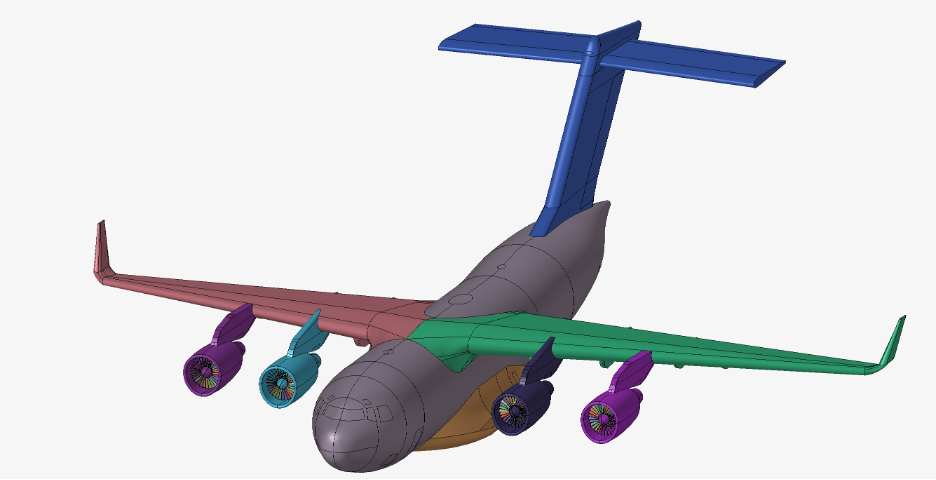
To prepare this model, the team at Designfusion used Altair Hypermesh, which is now part of the Siemens Digital Engineering product portfolio.
At Designfusion, we harness the power of CAD and simulation to deliver cutting-edge engineering solutions that meet the highest standards of precision and innovation. By leveraging advanced simulation capabilities alongside our design expertise, we turn visionary concepts into 3D models, driving excellence in every project we undertake.
Get in touch and see how we can help you today.
Lohith Porwal is an Application Specialist and has over 7 years of experience as a CAE analyst. He has been with Designfusion since October 2024, supporting Siemens CAE tools. His main focus is developing workflows and providing support on live projects.
Designfusion is the largest dedicated solution provider of Siemens PLM software in North America. With an expert support team and a decade of history in the industry designfusion is the #1 choice for companies looking to best enhance their software acquisition.
305 Milner Ave, Suite 308,
Toronto, Ontario, M1B 3V4
Canada
Phone: 416 267-5542
Toll Free: 1-888-567-3933


2734, rue Étienne Lenoir Laval, Quebec. H7R 0A3
Canada
Phone: 514-761-5682
Toll Free: 1-866-534-5682


565, rue Shefford, Suite 1
Bromont, Québec, J2L 1C2
Canada
Phone: 450-534-5682
Toll Free: 1-866-534-5682
1400 E Touhy Ave, Suite 477
Des Plaines, IL 60018
USA
Phone: 847-439-0555
Toll Free: 1-866-921-1830
2900 Auburn Court
Auburn Hills, MI 48326
USA
Toll Free: 1-866-921-1830
151 Castleberry Ct. Ste. C
Milford, OH 45150 USA
Toll Free: 1-866-921-1830
60 Scarsdale Rd, Unit 119
Toronto, Ontario, M3B 2R7
Canada
1919, Boulevard Lionel-Bertrand Suite 101, Boisbriand,
QC J7H 1N8, Canada

