


This resource portal is for active Designfusion customers.

Dashboard Home
Solid Edge Quick Tip - How to Create an Account to Access the Siemens Support Page
To create a new account to accessSiemens Support, follow these steps:
- Go to the SiemensID Account signup page
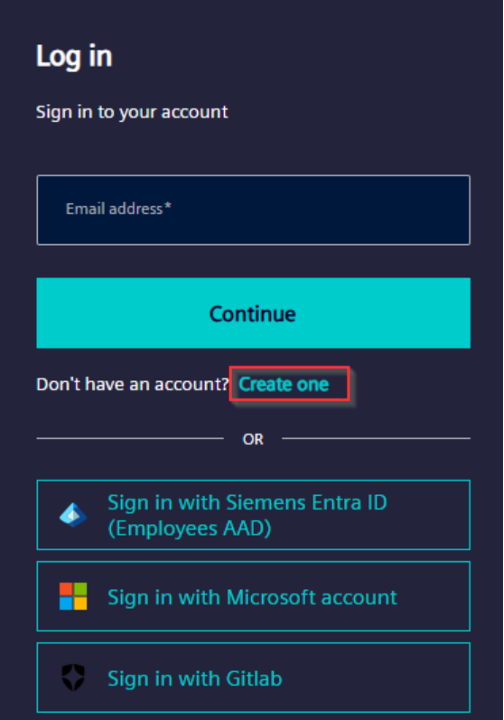
- Click "Log in"

- Click on "Create One"
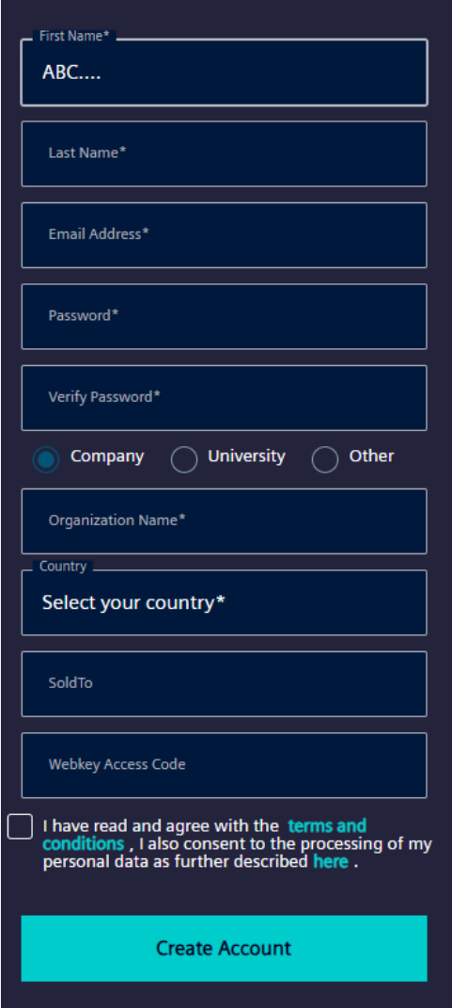
- Fill in the required details in the registration form
Key points to note
- The "Sold to" (Site ID) and "Webkey Access Code" fields are optional
- Use an email address you frequently check
- Ensure you provide accurate information
Important Updates (as of July 15, 2024)
- The Support Center login interface has been updated to use Siemens ID
- This change improves security by ensuring Zero Trust Compliance
- Existing users can continue using their current credentials
Additional Login Changes
- You'll now see a CAPTCHA at the login screen
- First-time login will require accepting revised Terms and Conditions
You may be prompted to provide additional profile information like Organization Name, Organization Type, and Country
Solid Edge Quick Tip - How to Create an Account to Access the Siemens Support Page
November 13, 2025