


This resource portal is for active Designfusion customers.

Dashboard Home
Solid Edge Quick Tip - Can a Solid Edge Standard Part be Modifiable?
This is a very generic question, and the respective answer depends on what you want to achieve.
1. In the Standard Parts Parts Management Administrator you choose whether you want to release the generated Standard Parts.
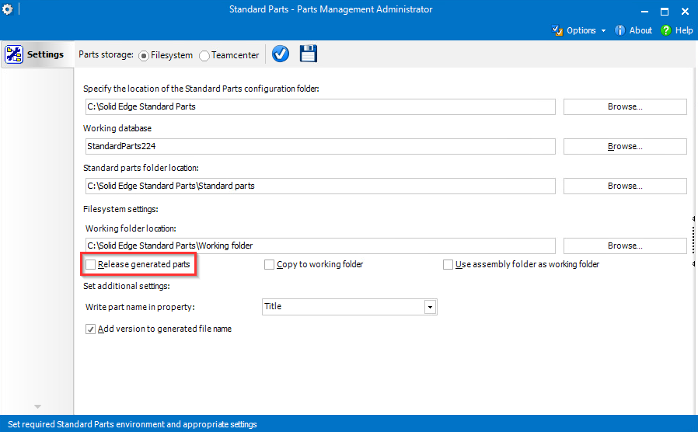
If you choose not to release them, they are AVAILABLE READ ONLY. Hence, the generated Standard Parts are either RELEASED or AVAILABLE read only.
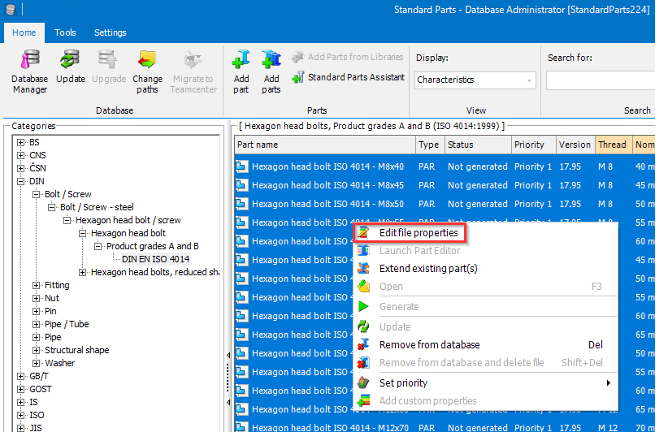
2. If you want to edit file properties, you use the Standard Parts Database Administrator where you can select all parts of one category and modify their file properties, again before they are generated.
3. If you want to modify the graphics of a Standard Part, it is the intentional behaviour to use the 'Copy to working folder' option. See more about Solid Edge Standard Parts working folder
Either the working folder or the assembly folder will be the defined location.
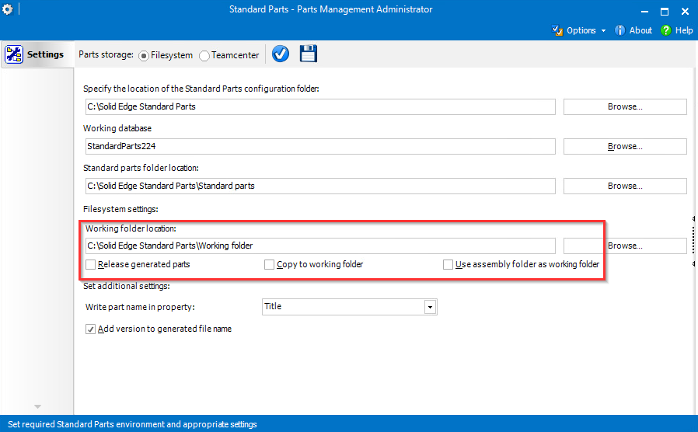
This option gives you a copy of the Standard Parts that the user can modify, while the original Standard Part remains read only in the Standard Parts folder and cannot be modified. That way it remains a Standard Part per definition and other users can still place that original Standard Part.
Note: This article came from the Siemens Support site and was updated on August 07, 2024.
January 23, 2026