


This resource portal is for active Designfusion customers.

Dashboard Home
NX Quick Tip – How to Show and Hide Tooltips
To show and hide tooltips, do the following:
1. Expand the Toolbar Options pulldown menu.

2. From the bottom of the pulldown menu select the Customize command.
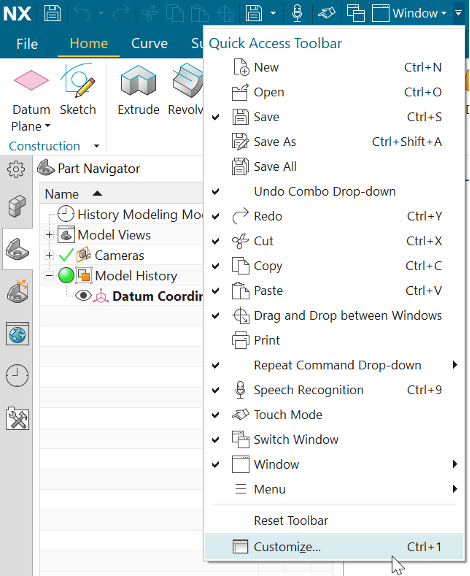
3. In the Customize dialog go to the Icons/Tooltips tap.

4. Check or uncheck the 2 tooltip options as needed.
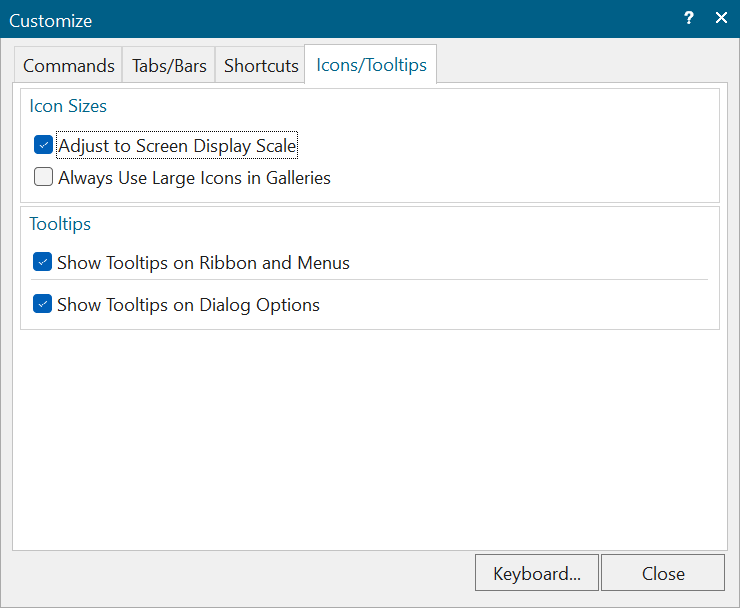
• The Show Tooltips on Ribbon and Menus function controls the display of tooltips for the commands on the Ribbon bar or Menu.
For example:

• The Show Tooltips on Dialog Options function controls the display of tooltips for the dialog box options.
For example:
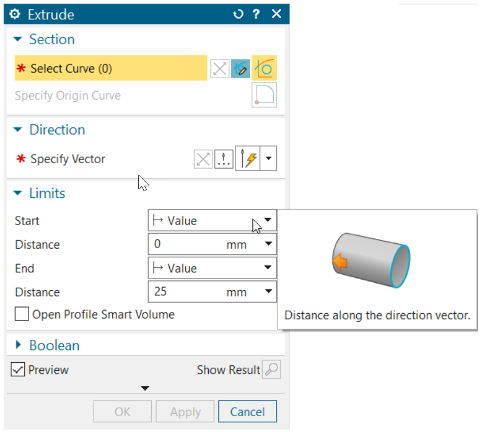
Note: NX Open users and Block UI Styler users can add tooltips to the dialog box options that they create using block properties.
NX Quick Tip – How to Show and Hide Tooltips
August 11, 2026