


This resource portal is for active Designfusion customers.

Dashboard Home
NX Quick Tip - How to Disable the Login Prompt When Launching NX
When Siemens Connector is installed and Teamcenter Share functionality is enabled, users are prompted to authenticate with their Siemens ID each time they launch NX. This article explains how to disable the automatic login prompt.
To disable the automatic login prompt when launching NX (note: this will disable Teamcenter Share functionality), follow these steps:
1. Navigate to File > Utilities > Customer Defaults...
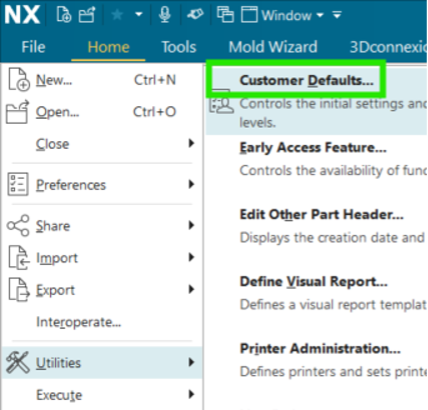
2. Continue by navigating to Gateway > General and select the Miscellaneous tab

3. Locate the Teamcenter Share group and turn off the Enable Teamcenter Share preference.

4. Restart NX and confirm you are no longer asked to log in.
NX Quick Tip - How to Disable the Login Prompt When Launching NX
June 9, 2026