


This resource portal is for active Designfusion customers.

Dashboard Home
NX - NX X Essentials FAQs
Q: What is NX X Essentials?
A: NX X Essentials brings computer-aided design (CAD), manufacturing (CAM) and engineering (CAE) to you - anywhere, on any device. Get design and engineering capabilities in a flexible web app, for instant access and a lower total cost of ownership.
Q: Does NX X Essentials use Teamcenter X data management services?
A: Today NX X Essentials uses Siemens Foundational Services for data management, however it can interoperate with Teamcenter via Teamcenter Share ad-hoc collaboration projects.
Q: Does NX X Essentials work with Teamcenter?
A: NX X Essentials operates on Teamcenter Share’s ad-hoc collaboration projects. Data can be transitioned between Teamcenter and Teamcenter Share via import and export, or via the “share with Teamcenter Share” capability available in Teamcenter hybrid SaaS products.
Q: Can NX X Essentials and Teamcenter Share access the same data?
A: Yes, NX X Essentials and Teamcenter Share operate on the same cloud-based project construct. The level of access another user has to that data is set by the project owner (e.g. review, review + download, full access, owner). The level of browser-based capability the recipient has is based on their license type (e.g. NX X Essentials provides CAD editing capability, whereas Teamcenter Share does not).
Q: How does NX X Essentials connect with other NX products?
A: The .PRT NX file type is the primary vehicle for working between NX X Essentials and other NX products. Simply drag and drop the file into NX X Essentials’ project area. This file can be accessed live and synchronized from both NX X Essentials and other NX products via NX’s Teamcenter Share integration or Connector’s desktop synced Windows folder. Connector is available from NX X Essentials’ home page.
Q: Do users working between NX X Essentials and other NX tiers need to be using the latest version?
A: Yes; while NX X Essentials can open older .PRT versions, upon save it will update the file version to the latest, and therefore the latest version of another NX tier is required to open that model. A warning of this file update is provided upon save, with options to save as, or revise, to preserve the original file.
Q: Do higher NX X tiers include NX X Essentials web editing capability?
A: No. Today, NX X Essentials must be purchased in addition to access web editing capability.
Q: How does NX X Essentials compare to other NX X tiers?
A: NX X Essentials is 100% compatible with other NX X tiers and NX products, with a focus on serving smaller businesses, or departments in larger businesses.
Q: Which higher tier NX features are supported in NX X Essentials?
A: NX X Essentials can create and edit common NX features to suit its mainstream market scope. For features that are beyond this scope, they are maintained in the model as read-only and are re-built when the model is updated. Read-only features are indicated. Some features are partially supported (see FAQ question on this topic).
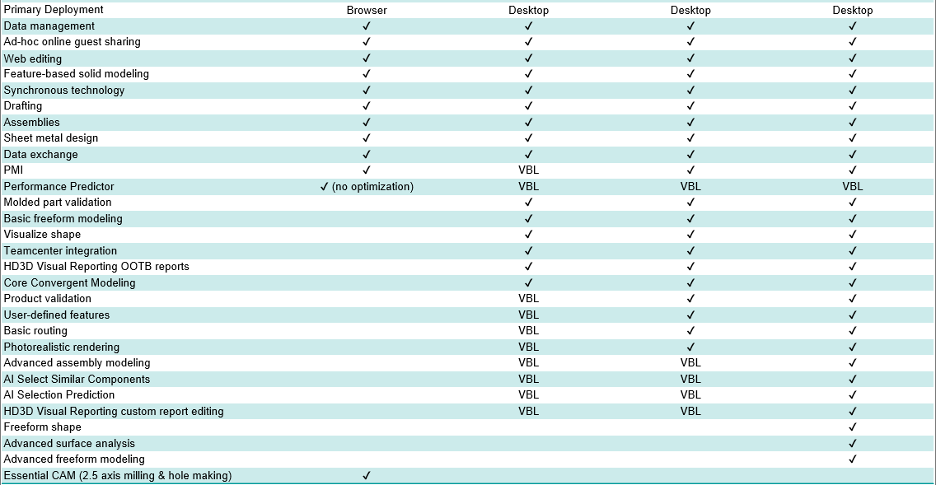
Q: How do partially supported NX features behave in NX X Essentials?
A: Many features have advanced settings/properties/parameters that are intentionally only available in higher tiers NX, leaving a simplified experience in NX X Essentials. When editing features in NX X Essentials that contain such “hidden” advanced parameters, they remain unchanged. On the other hand, features created in NX X Essentials can have their advanced parameters edited in higher tiers of NX.
Q: Are the capability levels of common commands between NX X Essentials and higher NX X tiers identical?
A: No; there are intentional differences between common commands to allow NX X Essentials to provide a simplified experience suitable for its market. However, features created by these commands are interoperable.
Q: Why is NX X Essentials user interface not identical to other NX tiers?
A: The goal of NX X Essentials UI is to balance familiarity within the NX family, with the opportunity that relative greenfield development allows for unconstrained innovation (that in turn improves the family as a whole). While this approach allows NX X Essentials to compete with other modern offerings in the marketplace, thanks to shared NX technology, customers enjoy familiar feature creation and editing interfaces, and native model read/write, or “roundtripping”.
Q: Does NX X Essentials work with Solid Edge?
A: Yes, NX X Essentials can view, markup and import Solid Edge data; upon import, geometric fidelity is the focus, with additional metadata supported over time. Solid Edge can import NX files (.PRTs), with the option to maintain associativity.
Q: How does NX X Essentials compare to Solid Edge X?
A: Solid Edge X is another great option for small and medium sized businesses, providing a desktop SaaS experience, whereas NX X Essentials is available as browser SaaS.
Q: Why is CAM capability in NX X Essentials, but not in the NX X Design family?
A: NX X Manufacturing (vs. NX X Design) tiers provide CAM capability. NX X Essentials is a cross-domain offering, seeding light CAM capability, upgradable to NX X Manufacturing.
Q: Does NX X Essentials work with file types for 3D Printing?
A: Yes, NX X Essentials can export and view & markup STL and OBJs which are common file types for 3D printing.
Q: Does NX X Essentials support PMI?
A: Yes, NX X Essentials is PMI-based for creating and documenting designs and can leverage existing NX PMI for model edits and drawing creation. PMI parameters that can’t be edited in NX X Essentials remain intact.
Q: Does NX X Design Standard include PMI since NX X Essentials does?
A: Today, PMI capability can be accessed NX X Design Standard via VBL tokens.
Q: Does NX X Essentials support Arrangements?
A: NX X Essentials can open and place Arrangements, however they cannot be edited or created today.
Q: Does NX X Essentials support sheet metal unfolding/flattening for blank shape?
A: Yes, NX X Essentials can generate a flat pattern automatically, with bend annotations, and export it as a .DXF for manufacture.
Q: Are there any Performance Predictor/simulation mesh refinement tools?
A: NX X Essentials uses a voxel-based technology, whereby analysis resolution is controlled on study set up. You can think of this like a picture resolution.
Q: Does NX X Essentials have a sketch history?
A: Sketches are captured in the history tree, with constraint management and undo available within sketch. We’ve not heard customers request a sketch history at the sketch entity level, but welcome observations and feedback here. To provide input, please start or join a discussion in the NX X Essentials Community (sign-in required).
Q: Does NX X Essentials have nesting for blank distribution?
A: Nesting is currently not available in NX X Essentials. To provide input, please start or join a discussion in the NX X Essentials Community (sign-in required).
Q: Is it possible to use a 3D mouse with NX X Essentials?
A: A 3D mouse, often referred to as a Spacemouse, is not currently supported by NX X Essentials. It's worth however trying out NX X Essentials’ touch screen support; 3D mouse hand on screen manipulating the model, while traditional mouse hand (on mouse or stylus) selects.
Q: Is it possible to find the top-level assemblies in NX X Essentials if not properly named?
A: Yes, NX X Essentials provides an icon in the file list indicating top-level assemblies for you.
Q: Is NX X Essentials’ built-in library powered by Cadenas?
A: Yes, NX X Essentials built-in library is powered by Cadenas, providing an always up to date global library of millions of off-the-shelf parts.
Q: Which CAD formats can NX X Essentials import & export?
• NX X Essentials can import the following CAD formats: NX parts and assembles (.prt), Solid Edge parts, sheet metal, and assemblies (.par, .asm, .psm), Solidworks parts and assemblies (.sldprt, .sldasm), Inventor parts (.ipt), Creo parts (.prt.version_number), Parasolid (.x_t), JT, and STEP parts and assemblies (.step, .stp).
• NX X Essentials can export the following CAD formats: NX parts and assembles, STL, 3MF, DXF flat patterns, and drawings as PDF.
• In addition NX X Essentials can view and markup the following CAD formats: NX parts, assemblies, and drawings (.prt), Solid Edge parts, sheet metal, assemblies, and drawings (.par, .psm, .asm, .dft), Solidworks parts and assemblies (.sldprt, .sldasm), Inventor parts (.ipt), Creo parts (.prt.version_number), STEP parts and assemblies (.step, .stp), Catia V4 parts and assemblies, Catia V5 parts, JT, IGES, STL, OBJ, DM PLMX, HyperLynx, and Capital electrical design.
• Other non-CAD file formats supported for view & markup include PDF, Microsoft Word (.docx, .doc), Microsoft Excel (.xlsx, .xls), and Microsoft Powerpoint (.pptx, .ppt), and images).
• The range of supported formats are continuously growing; check the latest information in product documentation.
Q: Does NX X Essentials auto-save CAD work?
A: Today NX X Essentials prioritizes a user's control to commit a change, meaning pressing save is required, however NX X Essentials has auto-recover in case a session ends unexpectedly. Auto-save with background versioning is in the roadmap. Note that step undo, and a feature tree is available to traverse CAD work.
Q: Does NX X Essentials provide a service that meets regulatory and compliance requirements set by government agencies to handle sensitive data and mission-critical workloads (e.g GovCloud, FedRAMP, ITAR)?
A: NX X Essentials doesn’t provide this service today, however it’s worth discussing with the customer if NX X Essentials can provide value to them outside of the specific projects that have such requirements.
Q: How often is NX X Essentials updated?
A: NX X Essentials has a quarterly cadence for main releases - March, June, September, and December, with monthly updates in between. Actual release dates are dependent on reaching the required quality level.
Q: Does the feature modeling of NX X Essentials the same as NX X Standard?
A: No. NX X Standard does have some things that NX X Essentials does not.
Q: Will we have VBL for NX X Essentials? Or do we start with NX X Standard?
A: VBL is NX X Standard and up. Think of Essentials as an entry point into the NX family of Designcenter and allows a path to expand at accounts with no data loss.
November 28, 2025